Spider Wizard Customer Service
Within just a few minutes after you order, you should receive an email with your registration code and instructions on how to enter it into the game.
If you do not receive this email, be sure to check any junk mail folders you may have as it is sometimes filtered out. The subject of the email is Your Spider Wizard Code and Instructions.
If you do not receive your email within 24 hours, Contact us.
If you need to download Spider Wizard again...
Click on the download button below and download the trial version. Then run the downloaded file to install, and use your registration code to register it as below.

If you lose your registration code...
You can request that it be sent to you again from our Lost Code Lookup.
How to Enter Your Registration Code
Run the game. Go to the main screen (where you see the names of all the games). Go to the Help menu and select About. This will bring up the About screen.
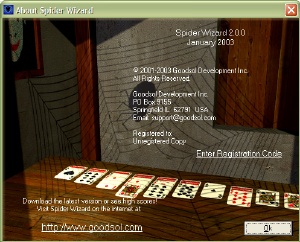
Press the R key to enter your code.
If you have an order problem...
See our Order Support Form.
If you have a technical problem...
See our Technical Support Form.
If you need to contact us...
See our Contact Form.
Spider Wizard

Windows Only
Buy Now
Download Now
Features
Customer Service
Lost Code
Contact Us
Site Map